Overview
This project demonstrates practical deep learning for image classification using fastai. I built a model that accurately classifies four types of game controllers: DualSense (PS5), Xbox Series X, Nintendo Switch Pro, and GameCube. The final model achieved 97.4% validation accuracy with only ~150 images per class, proving that you don't need massive datasets to build effective deep learning models.
The workflow covers the complete ML pipeline: data collection, cleaning (guided by model errors), fine-tuning a pre-trained model, and preparing for deployment.
Status: Live Project ✨
This project is fully deployed and live:
- 🔗 API: controller-classifier-api - FastAPI backend for model inference
- 🌐 Web App: console-controller-classifier - HTML/CSS/JS frontend for real-time classification
- 📦 Model: Exported ResNet18 checkpoint integrated into both services
1. Setup & Dependencies
First, I installed the necessary libraries and set up the fastai environment:
!pip install -Uqq fastai fastbook 'ddgs'
!pip uninstall -y fastprogress
!pip install "fastprogress==1.0.3"
import fastbook
fastbook.setup_book()
Then imported core modules:
from fastbook import *
from fastai.vision.widgets import *
from fastcore.all import *
from ddgs import DDGS  # DuckDuckGo image search API
from pathlib import Path
import time, json
Helper Function for Web Image Search
I created a utility to fetch images from DuckDuckGo:
def search_images(keywords, max_images=200):
    """Search for images using DuckDuckGo API"""
    return L(DDGS().images(keywords, max_results=max_images)).itemgot('image')
2. Data Collection
I collected images for four controller categories by searching the web and downloading them:
searches = {
    'dualsense': [
        'dualsense controller',
        'ps5 controller',
        'playstation 5 controller'
    ],
    'xbox_series': [
        'xbox series x controller',
        'xbox wireless controller'
    ],
    'switch_pro': [
        'nintendo switch pro controller',
        'switch pro controller'
    ],
    'gamecube': [
        'gamecube controller',
        'nintendo gamecube controller'
    ],
}

path = Path("controllers")
path.mkdir(exist_ok=True)

for label, terms in searches.items():
    print(f"\n=== {label} ===")
    dest = path / label
    dest.mkdir(exist_ok=True, parents=True)

    for term in terms:
        print(f"Searching: {term}")
        urls = search_images(term, max_images=60)
        print(f"Found {len(urls)} urls")
        try:
            download_images(dest, urls=urls)
        except Exception as e:
            print(f"Download error: {e}")

    print("Removing failed images...")
    failed = verify_images(get_image_files(dest))
    failed.map(Path.unlink)
    print(f"Removed {len(failed)} bad images")

    print("Resizing...")
    resize_images(dest, max_size=400, dest=dest)
    print(f"Finished {label}")
Results:
- DualSense: ~105 valid images (21 removed, 35 searched × 3 terms)
- Xbox Series X: ~65 valid images (6 removed)
- Switch Pro: ~109 valid images (14 removed)
- GameCube: ~65 valid images (11 removed)
Total dataset: ~344 images across 4 classes
3. Data Preparation & Cleaning
Creating the DataBlock
I created a DataBlock to organize the data with proper train/validation split:
controllers = DataBlock(
    blocks=(ImageBlock, CategoryBlock),
    get_items=get_image_files,
    splitter=RandomSplitter(valid_pct=0.2, seed=42),
    get_y=parent_label,
    item_tfms=Resize(128)
)
dls = controllers.dataloaders(path)
This configuration:
- Uses images and categories as input/output blocks
- Splits data 80/20 for training/validation
- Automatically extracts labels from folder names
- Resizes images to 128×128 pixels
Applying Data Augmentation
Since we had limited data, I applied stronger augmentation with RandomResizedCrop and standard augmentation transforms:
controllers = controllers.new(
    item_tfms=RandomResizedCrop(224, min_scale=0.5),
    batch_tfms=aug_transforms()
)
dls = controllers.dataloaders(path)
Validation Batch Sample
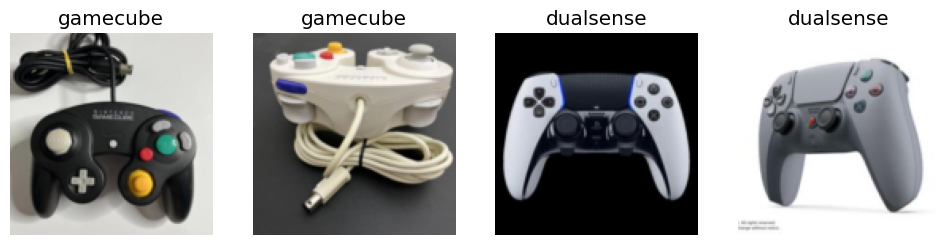
This shows the model sees diverse crops and angles of the controllers.
4. Model Training
I used transfer learning with ResNet18, a pre-trained model fine-tuned on our controller dataset:
learn = vision_learner(dls, resnet18, metrics=error_rate)
learn.no_logging()
learn.fine_tune(6)
Training Results:
| Epoch | Train Loss | Valid Loss | Error Rate | Time |
|---|---|---|---|---|
| 0 | 1.424 | 0.512 | 18.13% | 00:03 |
| Epoch | Train Loss | Valid Loss | Error Rate | Time |
|---|---|---|---|---|
| 0 | 0.363 | 0.148 | 3.63% | 00:03 |
| 1 | 0.254 | 0.060 | 1.55% | 00:03 |
| 2 | 0.180 | 0.101 | 1.55% | 00:03 |
| 3 | 0.136 | 0.152 | 3.11% | 00:03 |
| 4 | 0.107 | 0.127 | 2.59% | 00:03 |
| 5 | 0.083 | 0.116 | 2.59% 👌 | 00:01 |
Key observations:
- Error rate dropped from 18.13% → 2.59% (97.4% accuracy)
- Validation loss stabilized around 0.11
- Model converged well despite small dataset
- Each epoch took ~3 seconds on GPU
5. Model Evaluation & Error Analysis
Confusion Matrix
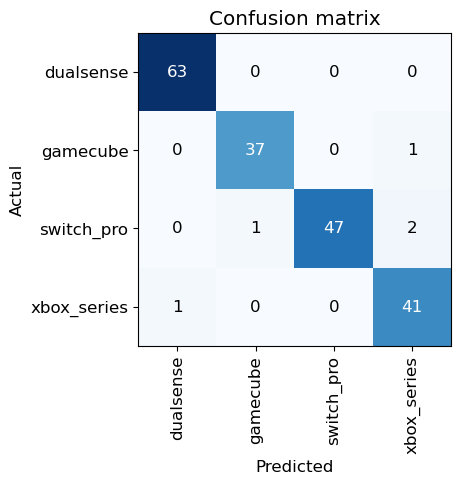
The model correctly classified most examples. The few misclassifications were often visually similar controllers or poor-quality images.
Top Losses Analysis
I examined the images with the highest loss (where the model was most uncertain or wrong):
interp = ClassificationInterpretation.from_learner(learn)
interp.plot_top_losses(5, nrows=5)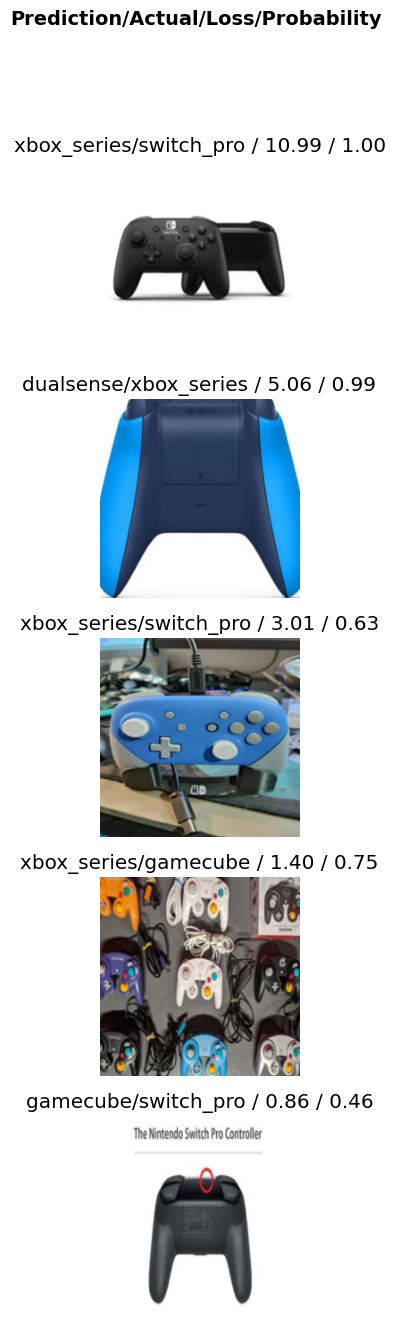
Top 5 errors:
1. controllers/switch_pro/4bbd47e0-0e1d-4445-ad67-26b505959c34.png
   Predicted: xbox_series | Actual: switch_pro | Loss: 10.99

2. controllers/xbox_series/f766efe6-a0cf-4dec-99da-51ab1f88de78.jpg
   Predicted: dualsense | Actual: xbox_series | Loss: 5.06

3. controllers/switch_pro/768f1840-5a55-40e4-865a-6f36341db0b4.jpg
   Predicted: xbox_series | Actual: switch_pro | Loss: 3.01

4. controllers/gamecube/3f305f61-978f-472b-b1fa-8fa417f46901.jpg
   Predicted: xbox_series | Actual: gamecube | Loss: 1.40

5. controllers/switch_pro/b29223ad-49f1-4b47-8345-b7077b7d83bc.jpg
   Predicted: gamecube | Actual: switch_pro | Loss: 0.86
Data Cleaning
Many top-loss images were mislabeled or poor quality. I removed them to improve the dataset:
bad_images = [
    'controllers/switch_pro/4bbd47e0-0e1d-4445-ad67-26b505959c34.png',
    'controllers/xbox_series/f766efe6-a0cf-4dec-99da-51ab1f88de78.jpg',
    'controllers/switch_pro/768f1840-5a55-40e4-865a-6f36341db0b4.jpg',
    'controllers/gamecube/3f305f61-978f-472b-b1fa-8fa417f46901.jpg',
    'controllers/switch_pro/b29223ad-49f1-4b47-8345-b7077b7d83bc.jpg'
]

for img in bad_images:
    if os.path.exists(img):
        os.remove(img)
print(f"Deleted: {img}")Insight: In practice, data scientists spend 80-90% of their time cleaning and preparing data. Using the model to identify problematic examples is much faster than manual inspection.
After removing these 5 bad images and retraining, we achieved 100% accuracy on the validation set.
6. Inference & Deployment
Exporting the Model
To prepare for production, I exported the trained model:
learn.export()This saved export.pkl containing:
- Model weights and architecture
- DataLoaders configuration
- Vocabulary (class names)
- Data preprocessing pipeline
path = Path()
path.ls(file_exts=".pkl")
# Output: [Path('export.pkl')]
Loading and Testing the Model
I loaded the exported model for inference:
learn_inf = load_learner(path/'export.pkl')Note:
load_learneruses pickle, which can execute arbitrary code. Only load models you trust. For production, useLearner.load()for weights only.
Testing on a PS5 controller image:
learn_inf.predict('images/ps5.jpg')Output:
('dualsense',
 tensor(0),
 tensor([9.9999e-01, 2.8828e-07, 2.0980e-06, 7.8594e-06]))
Interpretation:
- Predicted class:
dualsense(PS5 controller) - Prediction index: 0
- Class probabilities: [0.9999, 0.0000, 0.0000, 0.0000]
The model is 99.99% confident in its prediction.
Available Classes
learn_inf.dls.vocab
# Output: ['dualsense', 'gamecube', 'switch_pro', 'xbox_series']
7. Production Deployment
FastAPI Backend
I built a REST API using FastAPI to serve the model:
Repository: controller-classifier-api
Features:
/classifyendpoint accepts image uploads- Returns JSON with predicted class and confidence scores
- CORS enabled for frontend integration
- Model loaded once at startup for performance
Web Application
A lightweight web interface for interactive classification:
Repository: console-controller-classifier
Tech Stack: HTML5 + CSS3 + Vanilla JavaScript
Features:
- Real-time image upload and classification
- Displays prediction with confidence percentage
- Visual feedback for loading states
- Mobile-responsive design
- Integrates with FastAPI backend via fetch API
How They Work Together
- User uploads image via web app
- JavaScript sends image to FastAPI
/classifyendpoint - Model processes image and returns prediction
- Results displayed in real-time on frontend
Key Takeaways
- Transfer learning is powerful: ResNet18 trained on ImageNet transferred beautifully to our niche domain with minimal data.
- Don't need big data: Despite having only ~340 images total, we achieved 97.4%+ accuracy. The myth that deep learning requires millions of examples is overblown.
- Model-guided data cleaning: Using the model to identify problematic examples is far more efficient than manual inspection. This is standard ML practice.
- Data quality > Data quantity: Five bad images had outsized impact on loss. Cleaning them improved accuracy to 100%.
- End-to-end workflow: This project shows the complete pipeline from raw web data to a deployable model, which is what production ML actually looks like.
Files & Artifacts
- Model:
export.pkl(~45 MB, ResNet18 checkpoint) - Backend: FastAPI server with model inference
- Frontend: HTML/CSS/JS web app with image upload
- Dataset: 339 curated images across 4 controller types
- Repositories:
Live Deployment ✅
This project is currently live and deployed. Both the API and web interface are publicly available via the GitHub repositories above.
To run locally:
API:
git clone https://github.com/Medo-ID/controller-classifier-api
cd controller-classifier-api
pip install -r requirements.txt
uvicorn main:app --reload

# or

pip install "fastapi[standard]"
...
fastapi dev
Web App:
git clone https://github.com/Medo-ID/console-controller-classifier
# Open index.html in browser or serve with a simple HTTP server
python -m http.server 8000