Production RAG with LangChain & Vector Databases
These are my personal notes from LangChain, LangGraph Docs and the Production RAG with LangChain & Vector Databases full course by freeCodeCamp. They cover the course from start to finish, setup, chunking strategies, hybrid search, production architecture, Agentic RAG, and the advanced topics at the end. I might keep expanding this document, or add new one as I work through the RAG and Agents sections in AI Engineering by Chip Huyen.
Disclaimer: The AI landscape moves fast. While the specific APIs, package names, and library methods documented here will inevitably evolve, the core architectural principles and engineering techniques are fundamental. Always cross-reference with the latest official documentation before implementation, but trust that these underlying concepts will remain relevant.
Project Setup
To setup a RAG project we need API keys (OpenAI, Anthropic, ...):
curl -LsSf https://astral.sh/uv/install.sh | sh    # install uv package manager
uv init                                            # initialize project
uv venv                                            # create virtual environment
source .venv/bin/activate                          # activate the venv
Add the necessary libraries:
uv add langchain langchain-core langgraph langchain-openai langchain-anthropic python-dotenv langchain-community pypdfThe Complete RAG Pipeline
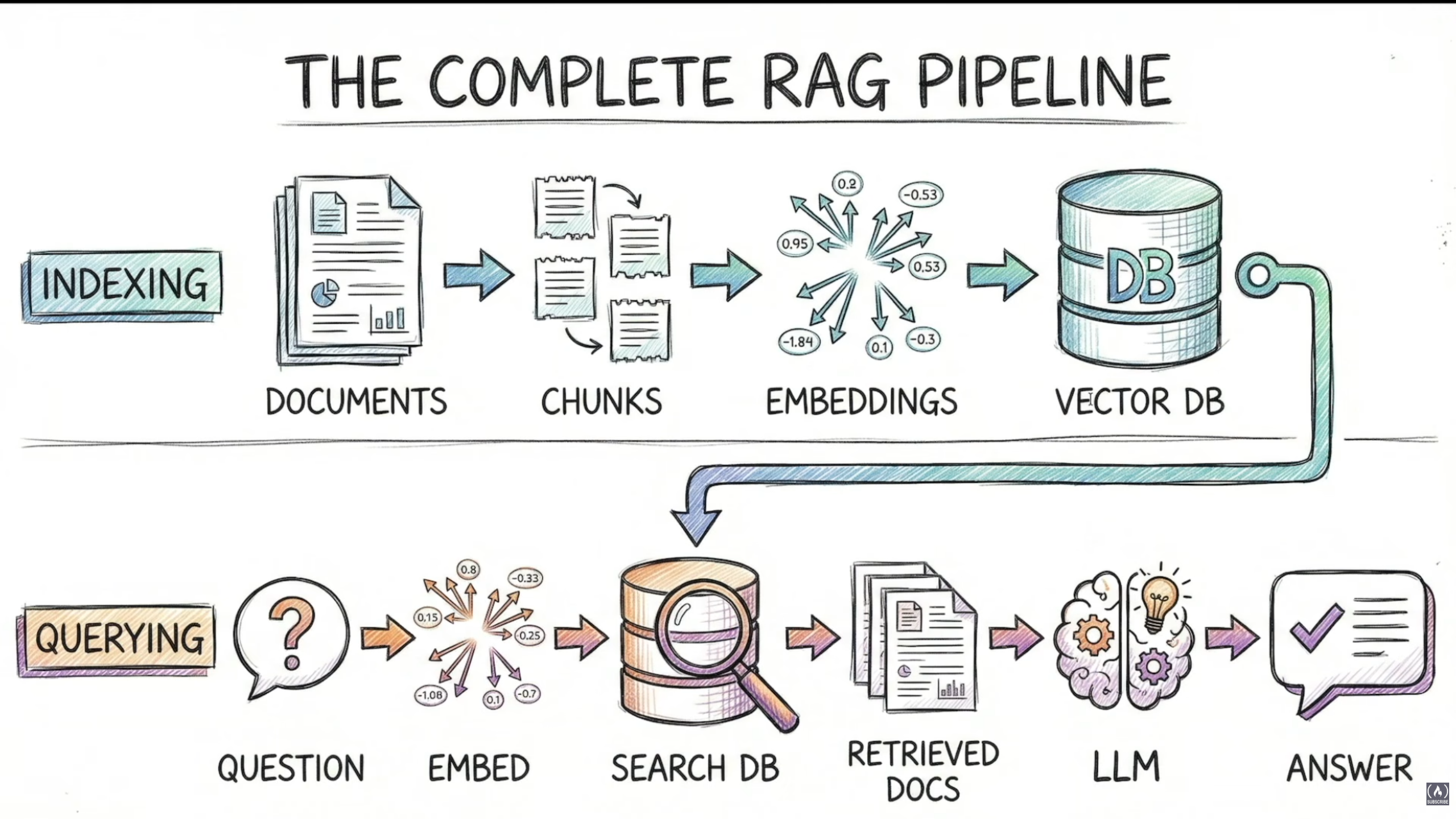
RAG has two main phases: Indexing (offline, done once) and Querying (real-time, done on every request).
Indexing Pipeline
- Document Loaders: Extract content from files, handle different formats
- Text Splitters: Chunk into 500-1000 char pieces, preserve sentence boundaries, add overlap (100-200 chars)
- Embedding Generation: Convert each chunk to a vector using OpenAI/Cohere API
- Vector Storage: Store in Chroma/Pinecone, indexed for fast search
Ready for queries!
Querying Pipeline
- Take the user's question
- Embed the query using the same embedding model used during indexing this creates the query vector
- Search the vector database for similar vectors
- Retrieve the original text for those vectors
- Augment: combine
system prompt + retrieved chunks + user query - Pass everything to a chat model to generate an accurate answer
Three rules for production RAG:
- Same embedding model everywhere: ensures consistency across ingestion, indexing, and querying. Avoids mismatch errors.
- Embedding quality > quantity: prioritize high-quality relevant vectors over massive noisy datasets. Less is often more.
- Test retrieval separately: validate retrieval performance independently from generation. Use specific evaluation metrics.
Document Processing: Chunking
Chunking Decision Framework
| Document Type | Splitter | Chunk Size |
|---|---|---|
| General Docs | Recursive | 500-1000 |
| Technical | Semantic | Auto |
| Code | Code Splitter | Function |
| Markdown | MD Splitter | Headers |
Use Recursive for prototyping and simple structured docs. Use Semantic when quality is crucial or content shifts topics without clear headings. Start with recursive, upgrade if needed.
How each works:
- Recursive: splits by paragraphs first, then lines if still too big, then sentences, and so on.
- Semantic: embeds each sentence, compares adjacent embeddings, splits where similarity drops.
Late Chunking is a newer approach: embed the full document first, then chunk. This means each chunk carries full document-level context including pronoun references. The embedding model needs to support this (e.g. Jina).
Advanced Chunking Strategies
Parent Document Retriever: great when context is large and you need precision. The idea: create two splitters, one with big chunks (parent, e.g. 800 chars) and one with small chunks (child). Use ParentDocumentRetriever passing vectorstore, docstore, child_splitter, and parent_splitter. The small child chunks give high search precision, but the LLM receives the full parent chunk, so it gets all the context it needs to generate a complete answer.
Contextual Compression Retriever: useful when dealing with large documents or large context. Pass a base_compressor (instantiated from an LLM via LLMChainExtractor.from_llm()) and a base_retriever (the standard vectorstore.as_retriever()). This reduces token usage, improves LLM response quality by narrowing down context, reduces noise, and speeds up inference. The tradeoff: extra calls to the completion endpoint at retrieval time. Worth it when documents are large with mixed content, when you need precise retrieval, and when token costs matter at scale.
Code reference: advanced_rag.py covers ParentDocumentRetriever, ContextualCompressionRetriever, EnsembleRetriever, and MultiQueryRetriever with working examples.
Chunking Approaches Comparison
| Approach | Context Quality | Implementation Cost |
|---|---|---|
| Early Chunking (Traditional) | ★☆☆ Poor, pronouns orphaned | ★★★ Free, standard approach |
| Overlapping Chunks | ★★☆ Better, some context kept | ★★★ Free, just a config change |
| Contextual Retrieval | ★★★ Excellent, LLM adds context | ★★☆ LLM cost ~$0.01/doc |
| Late Chunking (Native) | ★★★ Excellent, full doc context | ★★☆ Special model (Jina or similar) |
| Parent-Child Retriever | ★★★ Excellent, returns parent doc | ★★☆ Extra storage (2x vector store) |
Building a Basic RAG System
Step 1 — Create a vector store from knowledge base:
- Init
RecursiveCharacterTextSplitterwithchunk_size=500andchunk_overlap=50 - Load the document with its metadata and split into chunks
- Create a vector store from the chunks using the same embedding model and a persist directory. Return it.
Step 2 — Build the RAG chain:
- Instantiate the vector store from step 1 and call
.as_retriever()withsearch_type="similarity"andsearch_kwargs={"k": 2} - Init a chat model (LLM) from a provider (OpenAI, Anthropic, Ollama, ...)
- Create a RAG prompt template using
ChatPromptTemplate.from_template. Use{context}and{question}as template variables. - Format retrieved docs:
"\n\n".join([doc.page_content for doc in docs]) - Build the RAG chain using the
|pipeline operator:
rag_chain = (
    {"context": retriever | format_docs, "question": RunnablePassthrough()}
    | prompt
    | llm
    | StrOutputParser()
)- Invoke with
.invoke(question)to get the answer.
Debugging RAG Systems
The 5 RAG Failure Modes
- Bad chunking: for recursive text splitter always use overlapping to preserve context and meaning
- Embedding mismatch: we can embed multiple values at the same time, but the model has to be the same one used at indexing time. The similarity score helps us get the right context based on meaning:
- Embed both the docs and the query
- Compute cosine similarity:
def cosine_sim(vec1, vec2): return np.dot(vec1, vec2) / (np.linalg.norm(vec1) * np.linalg.norm(vec2)) - Loop over doc vectors and calculate the similarity for each
- Rank results:
sorted(zip(docs, similarities), key=lambda x: x[1], reverse=True)
- Retrieval noise: irrelevant chunks making it into the context
- Context overflow: passing too many tokens to the LLM
- Hallucination: the LLM generates content not supported by the retrieved context
Vector Search is Not Enough
When vector search fails:
| Failure Case | Example |
|---|---|
| No semantic meaning | Product codes: SKU-7722XX specs |
| Model doesn't know abbreviations | Acronyms: WCAG compliance |
| Just characters to the embedding model | Error codes: E_CONN_REFUSED |
| Semantics override specifics | Exact names: John Smith accounting |
Solution: Hybrid Search Pipeline
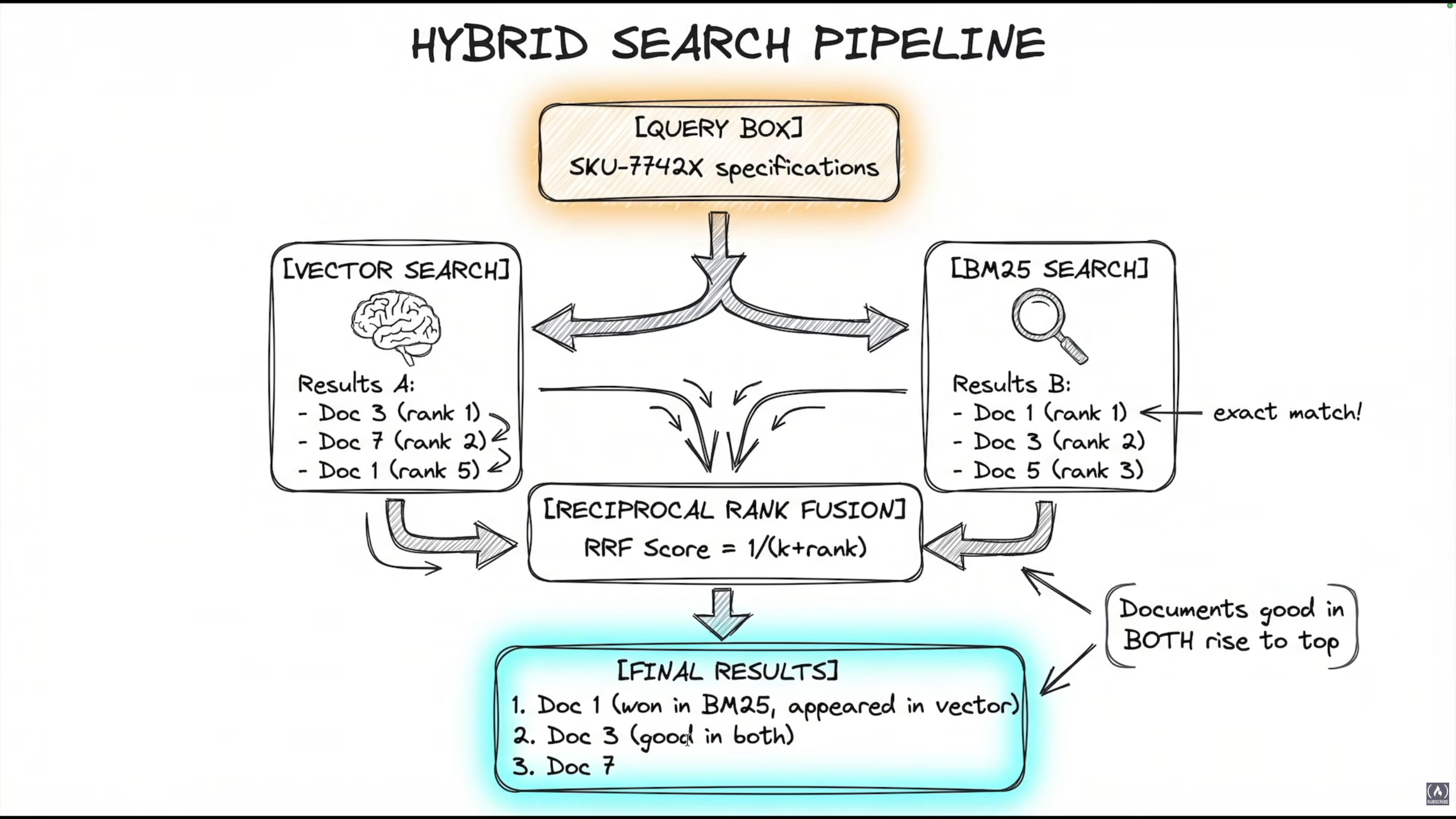
Combine both Vector Search (semantic understanding) and BM25 Search (exact keyword matching):
# Vector retriever. Semantic understanding (we already have this)
vector_retriever = vector_store.as_retriever(search_kwargs={"k": 3})

# BM25 retriever. Keyword matching (one line to add)
bm25_retriever = BM25Retriever.from_documents(docs, k=3)

# Ensemble retriever. Combines with RRF (two lines to add)
ensemble_retriever = EnsembleRetriever(
    retrievers=[bm25_retriever, vector_retriever],
    weights=[0.5, 0.5]
)
RRF = Reciprocal Rank Fusion. Score formula: RRF score = 1 / (k + rank). Documents that rank well in both retrievers rise to the top.
Notes on usage:
- Start weights at 50/50. Tune based on your query patterns.
- BM25 doesn't support incremental adds, rebuild it whenever new documents are added.
- For
k, retrieve more and let RRF sort. 4 or higher is recommended. - Hybrid search adds latency, but in production with real users the accuracy boost is worth it.
Code reference: advanced_rag.py, demo_ensemble_hybrid_search() shows a working BM25 + vector ensemble with side-by-side result comparison.
Context Overflow and Token Budgeting
The idea is to build a mechanism that tracks token usage per user per hour, per endpoint, and logs it for traceability. Example output: {'total_input': 3, 'total_output': 280, 'requests': 1, 'total_tokens': 300, 'avg_per_request': 230.0}.
The implementation approach:
- Set a
max_tokens_per_request - Define an
estimate_tokensfunction - Check if the request is within budget before calling the LLM
- Record token usage for traceability
You can also build a BudgetedLLM class that wraps any LLM model and budget. It should have an invoke method that checks the budget before calling the LLM, and a method to retrieve current usage stats.
Add model routing when traffic volume justifies the cost of a classifier. The global strategy is:
- Add model routing when traffic volume justifies the classifier
- Add token budgeting when you have user inputs or unpredictable lengths
- Add per-user, per-endpoint budget tracking for chargeback and abuse prevention
Observability & Traceability
Install LangSmith:
uv add langsmithAdd environment variables:
export LANGSMITH_API_KEY="key"
export LANGSMITH_TRACING="true"
export LANGSMITH_PROJECT="name"
When you want to trace a function (any LLM call), add the decorator:
@traceable(name="basic_chaining")
def my_rag_function(query: str) -> str:
    ...
You can also add tags for extra metadata.
RAG Optimization
Chunking Strategy Notes
- Semantic chunking isn't always better. For well-structured documents with clear headings and sections, recursive/structural chunking preserves logical boundaries that semantic chunking can actually destroy.
- Semantic chunking shines with unstructured flowing text where topic shifts aren't marked by headers.
Scaling RAG: Vector Database Tuning (HNSW)
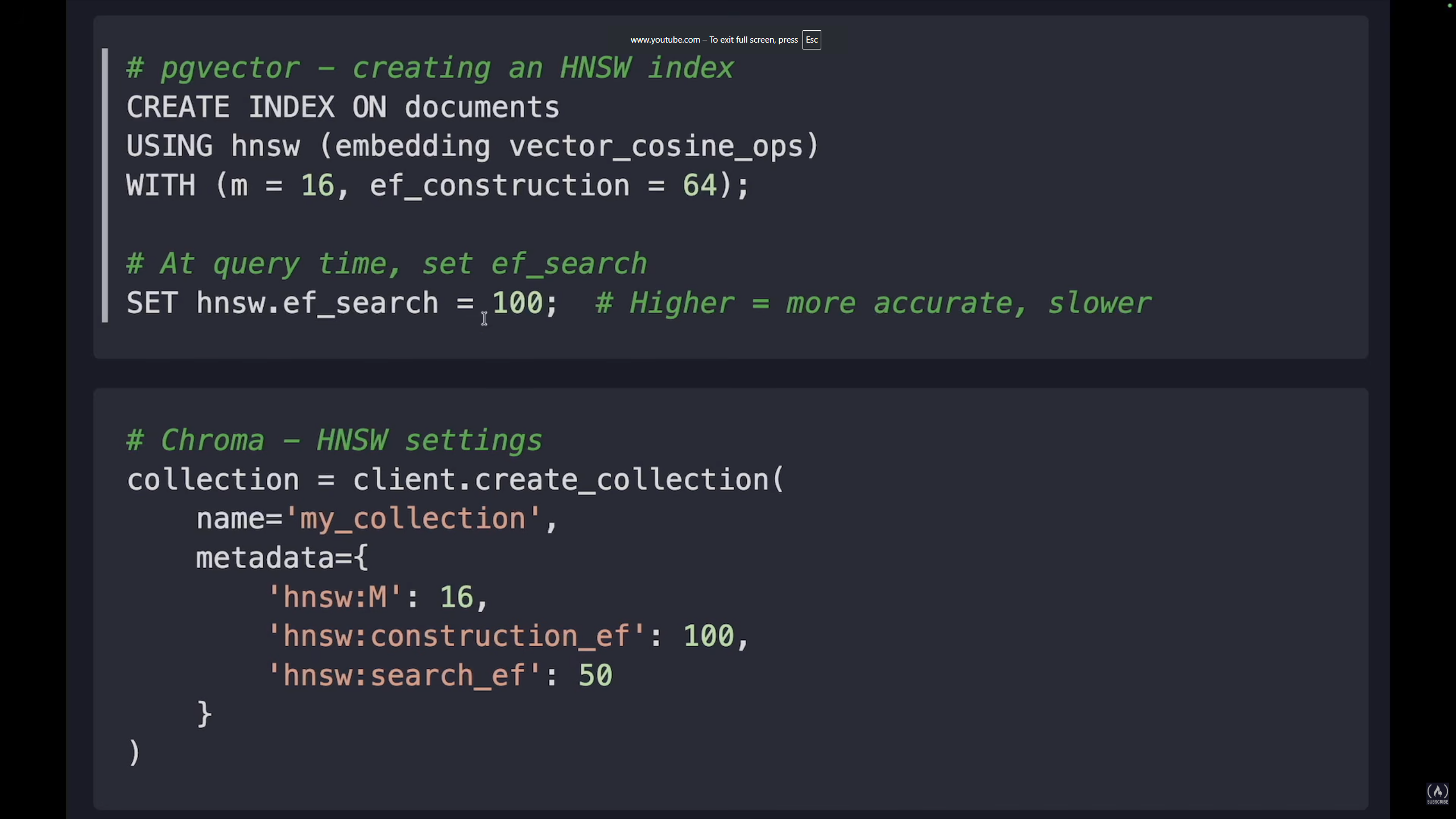
The main bottleneck when scaling RAG is the vector database. HNSW (Hierarchical Navigable Small World) is the index algorithm used by pgvector, Chroma, and most others. Two parameters control the trade-off:
- M (Max connections): Low (8-16) = smaller index, faster builds. High (32-64) = larger index, higher accuracy.
- EF (Search effort): Low (32-64) = faster search. High (200+) = higher accuracy.
More M = more connections per node = more memory = better accuracy. More EF = larger candidate list during search = slower = better accuracy.
Recommendations:
- Prototyping:
m=16, ef=40→ speed - Production:
m=16-32, ef=100→ balanced - High accuracy:
m=32, ef=200→ accuracy
Cost Optimization Strategies
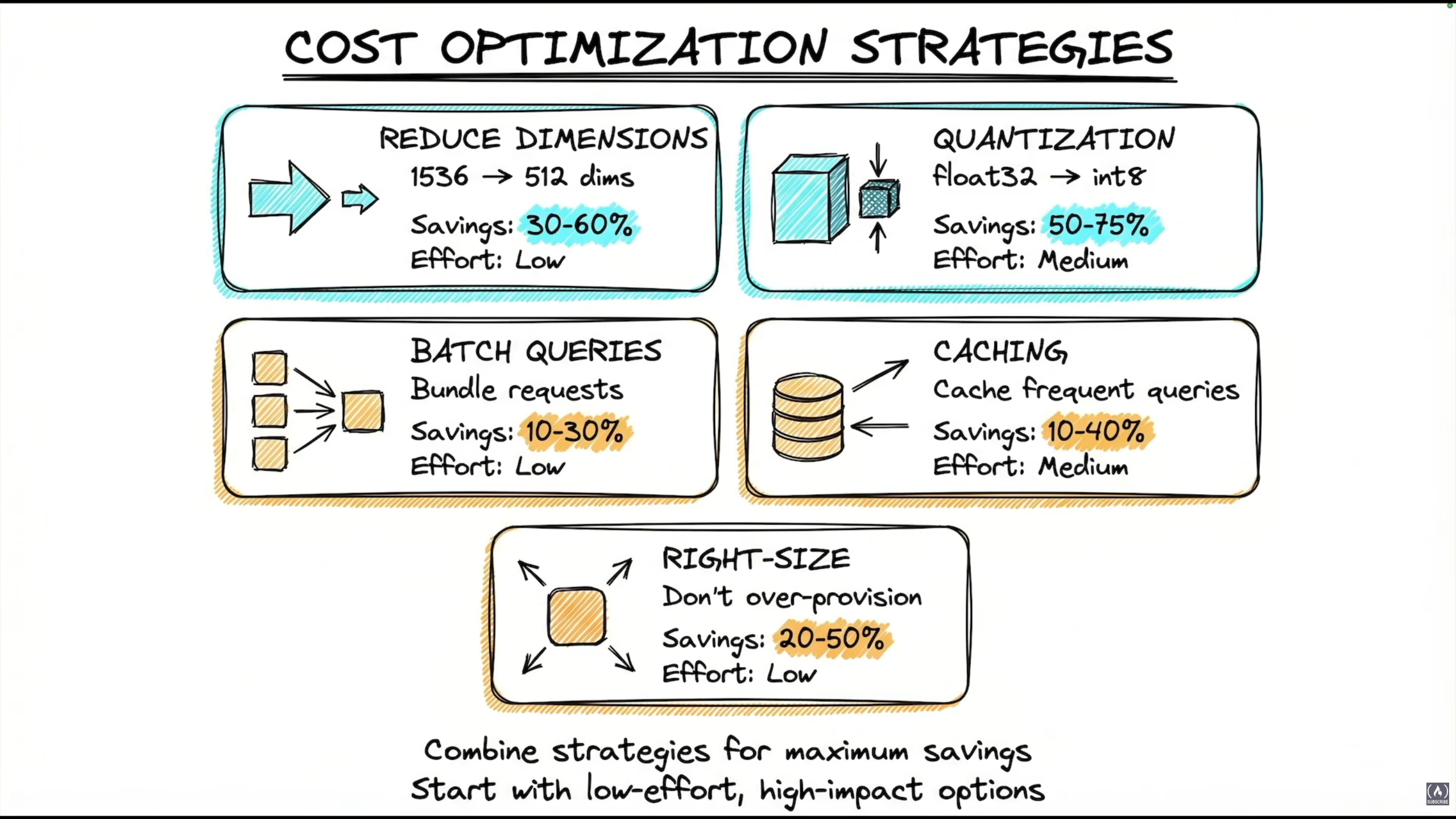
| Strategy | Savings | Effort |
|---|---|---|
| Reduce dimensions (1536 → 512) | 30-60% | Low |
| Quantization (float32 → int8) | 50-75% | Medium |
| Batch queries (bundle requests) | 10-30% | Low |
| Caching frequent queries | 10-40% | Medium |
| Right-size (don't over-provision) | 20-50% | Low |
Combine strategies for maximum savings. Start with low-effort, high-impact ones.
For semantic caching in production:
- Embed the query into a vector
- Search the cache by vector similarity
- Return cached result if similarity > threshold (e.g.
0.95)
Production Visibility
Three layers that work together:
- Layer 1: Structured Logging → what happened
- Layer 2: Metrics Collection → how much happened
- Layer 3: Instrumented LLM → wraps both layers
The monitoring layer wraps everything: from Security all the way to Cost Optimization and Error Handling.
Production Project Structure
This is how a production RAG API is structured. The full reference implementation is here: lang-production-api.
lang-production-api/
├── app/
│   ├── config.py       # settings, env loading, lru_cache
│   ├── models.py       # Pydantic request/response models
│   ├── security.py     # input sanitizer, PII detector, output validation
│   ├── cache.py        # semantic cache (Redis in production)
│   ├── monitoring.py   # structured logger, metrics collector
│   └── agent.py        # LangGraph production agent
├── tests/
│   ├── test_security.py
│   └── test_cache.py
├── main.py             # FastAPI app, lifespan, endpoints
├── Dockerfile
├── docker-compose.yml
├── pyproject.toml
└── .env.example
1. Config (config.py)
- Env file with all necessary keys (
OPENAI_API_KEY,LANGCHAIN_API_KEY, ...) - Use
pydantic_settingsto load and validate required keys - Use
@lru_cachedecorator to load settings only once - Include an
is_prodflag
2. Models (models.py)
Pydantic models for input validation and response structure:
class ChatRequest(BaseModel):
    message: str = Field(max_length=1000, description="...")
    thread_id: Optional[str] = None

class ChatResponse(BaseModel): ...
class HealthResponse(BaseModel): ...
3. Security (security.py)
InputSanitizer: usesINJECTION_PATTERNSand a clean method to remove or replace dangerous charsPIIDetector: detects and masks personally identifiable information, both on input (before LLM) and output (before client)OutputValidator: validates LLM output before returning to client. Catches PII leakage and harmful content in responses.SecurityPipeline: wires the three above into a single class to plug into the API
4. Cache (cache.py)
In production use Redis for: persistence across restarts, shared cache across multiple instances, and built-in TTL (time-to-live) management. Make sure you can observe stats of your cache instance.
5. Monitoring (monitoring.py)
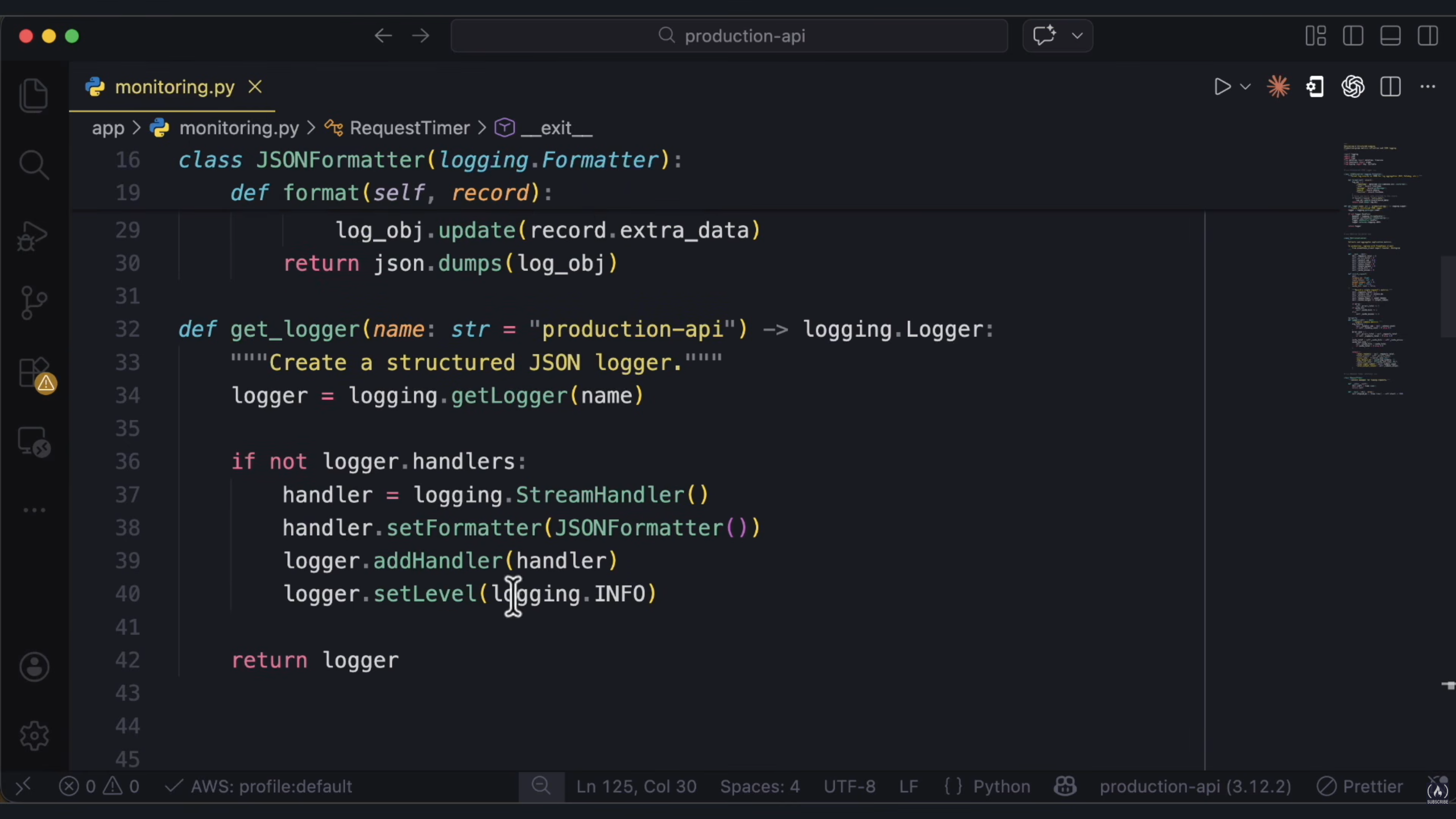
- Format log records as JSON for log aggregation + merge extra data attached to the record
get_logger(): creates a structured JSON logger with aStreamHandlerandJSONFormatter. Theif not logger.handlersguard prevents duplicate handlers.MetricsCollector: tracks everything: latency, token usage, errors, cache hits, request count. For production, plug in Prometheus.
6. Agent (agent.py)
AgentState: the state for the production agent. UsesAnnotatedwithadd_messagesreducer for message accumulation. Fields:messages,error,retry_count,model_used, ...ProductionAgent: LangGraph agent with retry on failure (model fallback), graceful error handling, and LangSmith tracing.- Inside the agent, try processing with the primary model. On failure, try the fallback/secondary model. On total failure, return a graceful error message.
- Inside
_build_graph: add nodes, edges, and conditional edges. Decide what to do after each model attempt. Return the compiled graph. - The
invokemethod (decorated with@traceable) takes a user message and returnsresponse,model_used, anderror(orNone).
7. Main API (main.py)
async def lifespan(app: FastAPI):
    # initialize all components on startup
    yield
    # clean up on shutdown
This is the modern FastAPI pattern (replaces the deprecated @app.on_event).
/chat POST endpoint flow:
- Security check (injection + PII masking)
- Cache lookup
- LangGraph agent invoke (if cache miss)
- Output validation
- Cache store
- Return response
Other endpoints:
/health: Docker/Kubernetes health check/metrics: monitoring dashboards/cache/stats: cache performance statistics
Also add a rate limiter and an exception handler for when the limit is exceeded.
8. Tests
test_security.py: runs without any LLM calls. Fast, free, and deterministic. Useassertfrom Python, run withpytest.test_cache.py: test TTL behavior usingtime.sleep.
Testing strategy: fast unit tests → integration tests with mocked agents → real LLM tests (only in staging).
9. Containerizing with Docker
FROM python:3.12-slim
WORKDIR /app

# Create non-root user for security (appuser should own /app)
RUN useradd --create-home appuser && chown appuser:appuser /app

# Install uv (fast Python package manager)
RUN pip install uv

# Copy dependency files first (Docker layer caching)
COPY --chown=appuser:appuser pyproject.toml .
COPY --chown=appuser:appuser uv.lock* .

# Switch to non-root user before installing deps
USER appuser

# Install dependencies
RUN uv sync --frozen --no-dev

# Copy application code
COPY --chown=appuser:appuser app/ app/

EXPOSE 8000

HEALTHCHECK --interval=30s --timeout=10s --retries=3 \
  CMD curl -f http://localhost:8000/health || exit 1

CMD ["uv", "run", "uvicorn", "app.main:app", "--host", "0.0.0.0", "--port", "8000"]
# docker-compose.yml
services:
agent-api:
build: .
ports:
- "8000:8000"
env_file:
- .env
environment:
- APP_ENV=production
- LOG_LEVEL=INFO
healthcheck:
test: ["CMD", "curl", "-f", "http://localhost:8000/health"]
interval: 30s
timeout: 10s
retries: 3
restart: unless-stoppeddocker compose up --build10. Deploying
Push to GitHub and deploy. When using Docker, every time you update the service you need to build a new image and pull it for fresh content.
Agentic RAG: Self-Correcting Retrieval
- Traditional RAG: Query → Retrieve → Generate (one shot)
- Agentic RAG: Query → Retrieve → Evaluate → [Retry if needed] → Generate
To build Agentic RAG:
- Define
RAGState: aTypedDictwith fields:query,rewritten_query,documents,generation,relevance_score,retry_count,max_retries, ... - Create the vector store: embed docs and store them
retrieve_documents: retrieves documents based on the query. Usesrewritten_queryif available, otherwise uses the originalquery.grade_documents: this is the KEY difference from traditional RAG. We evaluate relevance BEFORE generating. Use an LLM chain to get relevance scores for each retrieved chunk.rewrite_query: called when initial retrieval fails to find relevant docs. Use the LLM to reformulate the query.generate_answer: after retrieving the right context, generate the prompt and invoke the LLM withchain.invoke()using the correct query and context.fallback_response: generates a graceful fallback when retrieval fails after all retries.should_retry_or_generate: the brain of Agentic RAG. Makes decisions based on retrieval quality and current state, routing to"rewrite","generate", or"fallback".- Build the graph:
workflow = StateGraph(RAGState)

workflow.add_node("retrieve", retrieve_documents)
workflow.add_node("grade", grade_documents)
workflow.add_node("rewrite", rewrite_query)
workflow.add_node("generate", generate_answer)
workflow.add_node("fallback", fallback_response)

workflow.set_entry_point("retrieve")
workflow.add_edge("retrieve", "grade")

# Conditional edge from grade, function returns one of the string keys
workflow.add_conditional_edges(
    "grade",
    should_retry_or_generate,
    {"rewrite": "rewrite", "generate": "generate", "fallback": "fallback"}
)

workflow.add_edge("rewrite", "retrieve")  # after rewrite, go back to retrieve
workflow.add_edge("generate", END)
workflow.add_edge("fallback", END)

app = workflow.compile()
When to use Agentic RAG:
- Complex queries that might need reformulation
- High-stakes applications where answer quality matters
- Diverse document types
- User-facing applications (vs batch processing)
Code reference: 04_agentic_rag.py in part6-advanced/.
Advanced RAG Topics
Do We Still Need RAG?
Newest models like Gemini and LLaMA now have 10M token context windows. So is RAG still needed when we have long context?
RAG is still the right choice when:
- You have a large knowledge base that should be used to get answers
- Your system allows for dynamic, frequently updated content
- You need precision, high accuracy, and source citations
Google reports that when you exceed ~60-70% of a model's context window, the model's effectiveness degrades.
You can also combine both, use RAG to retrieve relevant chunks, then load full documents into context for a detailed answer. Best for: "Tell me about X, then analyze deeply."
Think of RAG and long context as tools. Use one or both as needed.
Contextual Retrieval
Use an LLM to generate a contextual prefix for each chunk before embedding. This is the core idea:
- Give the LLM the full document and the specific chunk
- Ask it to write a brief context that situates the chunk within the document
- Prepend this context to the chunk before embedding
Production Considerations
Cost: ~$0.01-0.05 per document for context generation. This is a one-time cost at indexing time, much cheaper than retrieval failures.
Latency: Adds 1-2s per chunk during indexing. This is done offline, no impact on query latency.
Storage: Chunks are ~20-30% larger. Minimal impact on vector DB costs.
When to use it:
- Documents have important context in headers/titles
- Entities are referenced with pronouns ("the company", "they")
- Documents come from multiple sources
Key takeaways:
- Chunks lose context when split from documents
- Contextual Retrieval adds that context BEFORE embedding
- Use LLM to generate 1-2 sentence context prefix
- One-time cost at indexing, permanent retrieval improvement
- Anthropic reports 67% fewer retrieval failures using this technique
- Combine with BM25 hybrid search for best results
Code reference: 02_contextual_retrieval.py in part6-advanced/.
Late Chunking
The idea is to embed the full document first, then chunk it. This preserves document-level context and pronoun references. Each chunk ends up being aware of the full document around it, unlike traditional chunking where each chunk is embedded in isolation.
The tradeoff is that you need a model that explicitly supports late interaction / late chunking (e.g. Jina). The quality gain is similar to Contextual Retrieval, but without the extra LLM call at indexing time, the model handles it natively.
Code reference: 03_late_chunking.py in part6-advanced/.
Graph RAG
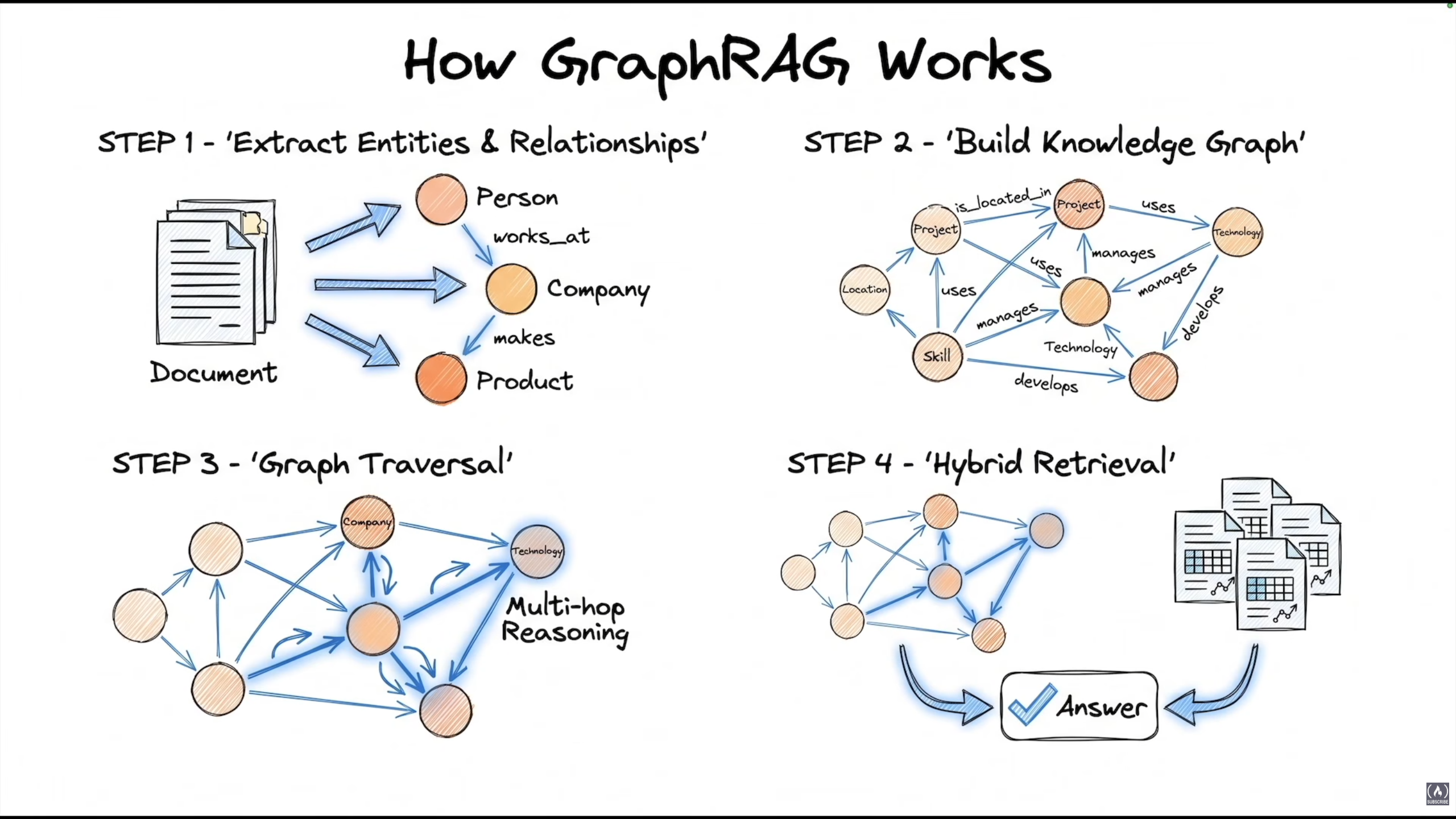
Standard RAG retrieves isolated chunks. What if the answer requires connecting facts from different chunks? GraphRAG is about connecting the dots, chunks are linked like a graph and can be traversed because they have relationships between them.
If a query involves multiple entities that need complex reasoning (and the LLM needs to understand the relationships between them to generate an accurate answer), we need to build those relationships first: extract entities, use an LLM to determine the type of relationship, and build a knowledge graph from that.
Two query modes:
- Local Search: multi-hop reasoning: identify entities in the query, traverse relationships to find answers. Good for specific questions about connections.
- Global Search: uses community summaries, aggregates knowledge across documents. Good for "What are the main themes?" type questions.
Implementation options:
- Option 1: Microsoft GraphRAG - recommended for full implementation
- Option 2: LangGraph + Neo4j - custom implementation, more control
- Option 3: LlamaIndex Knowledge Graph Index
- Option 4: Hybrid (Vector + Graph):
- Vector search to find relevant documents
- Extract entities from retrieved docs
- Graph traversal for multi-hop reasoning
- LLM synthesizes final answer
When to use GraphRAG:
- Documents describe relationships (org charts, research papers)
- Queries need multi-hop reasoning
- "Who/what is connected to X?" type questions
- Need global summarization across documents
When NOT to use it:
- Simple fact retrieval (standard RAG is enough)
- Small document sets (< 100 docs)
- Real-time indexing requirements
- Cost-sensitive applications (indexing is expensive)
Code reference: 05_graphrag_intro.py in part6-advanced/.
Multimodal RAG
The problem: text extraction DESTROYS visual information. Tables become jumbled text, charts lose all meaning, diagrams are completely lost, layout context disappears.
The solution: ColPali (or any capable vision model) - PDF → Convert to image → Embed images → Search.
The retrieved page images go to a vision-capable LLM which can "see" (process) tables, charts, and diagrams properly.
ColPali Key Insight
ColPali (Contextual Late-interaction for PaliGemma) creates embeddings that capture BOTH text AND visual layout in a single vector.
- Based on PaliGemma (Google's vision-language model)
- One embedding per document image
- Query embedding matches against document images
- No text extraction needed
The retrieved document IMAGE is sent to a vision-capable LLM which can actually "see" and understand the table/chart/diagram.
Full Pipeline
- Convert PDF pages to images
- Create image embeddings (done once, stored in vector DB)
- Search for relevant pages at query time
- Send retrieved images to a vision LLM for answering
- Fall back to text RAG for plain documents
When to Use Multimodal RAG
Perfect for: financial reports, technical documents, scientific papers, legal documents, medical records.
Not necessary for: plain text documents, simple structured data (CSV-like), documents where text extraction works well, real-time applications (vision models are slow), cost-sensitive applications.
Code reference: 06_multimodal_rag.py in part6-advanced/.